
BDR tips
Diagrams
You can also use PlantUML to create entity-relationships diagrams, look at the linked cheatsheet PlantUML and the section dedicated to EA diagrams...
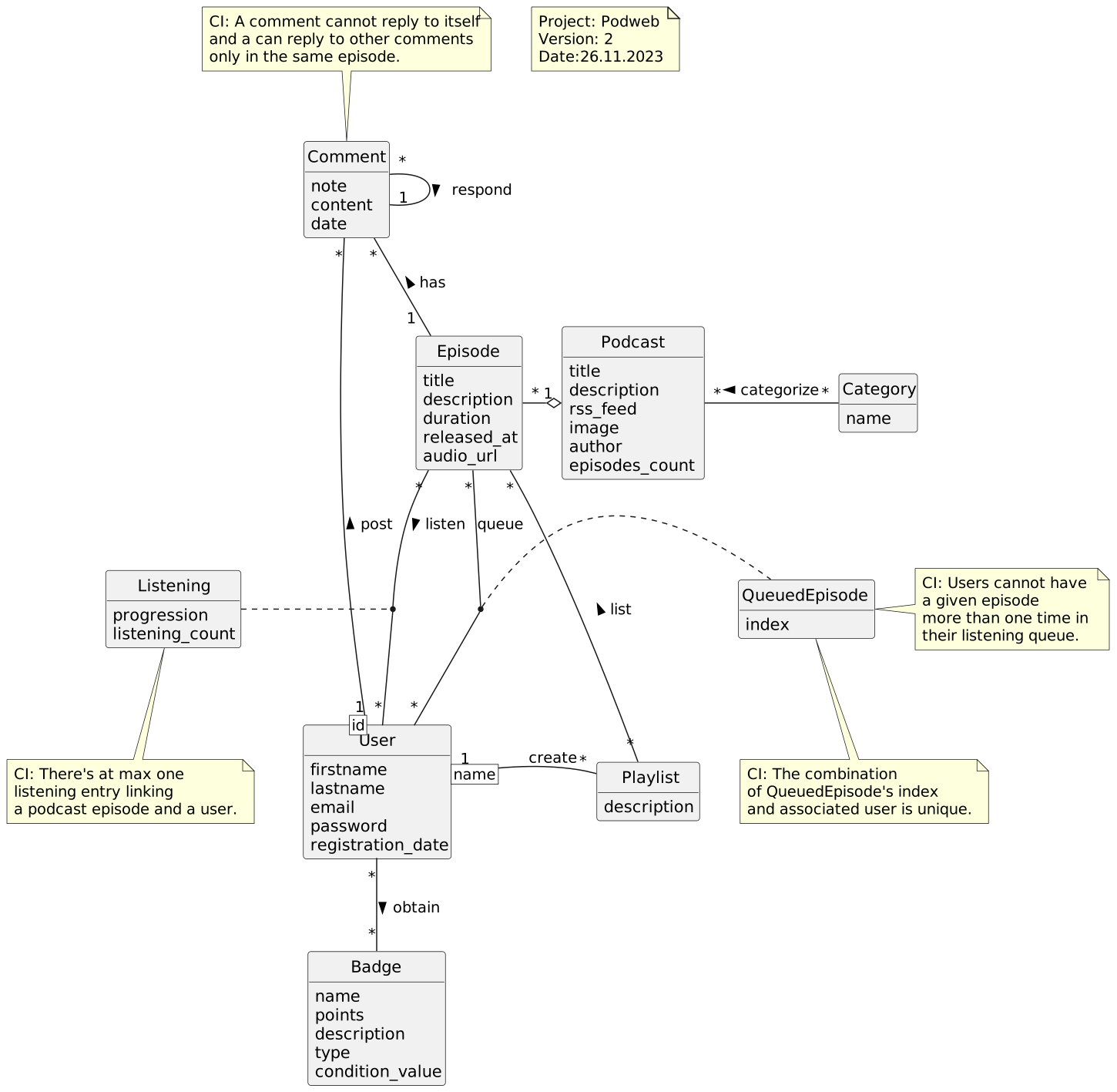
Here is an example from our final project:
-
MCD (EA diagram): mcd.puml and mcd.md with SVG export.
-
MLD (Logical diagram): mld.md with SVG export.
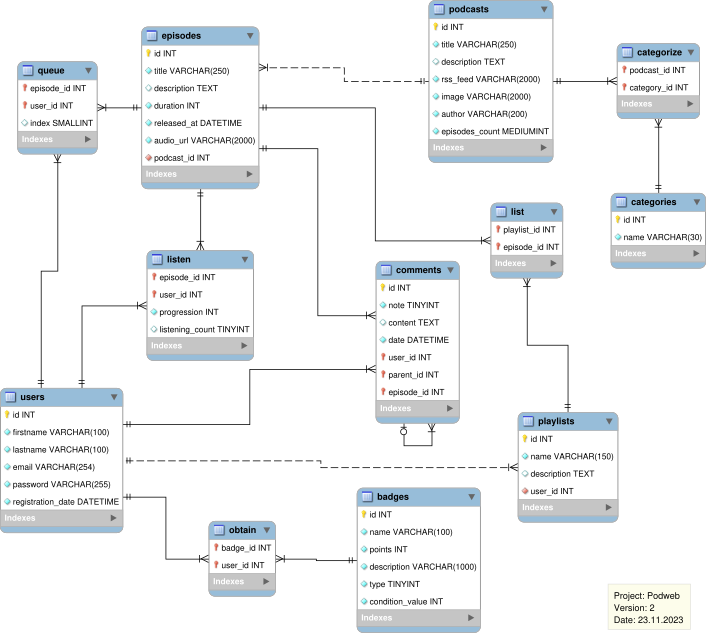
SQL <-> Logical diagram
Don't duplicate your work of defining a database with in SQL and in a schema twice ! There are probably better tools out there for this, but here is a working approach with MySQL Workbench. Maybe this would be possible in CTP one day if someone develops it...
From database to diagram
If you wrote the SQL or used a tool to generate a database from your code (several frameworks like Quarkus, Laravel and others allow that), here a few steps to genearte a logical diagram.
- Open MySQL Workbench, create a new model
- Connect to your database
- Click on Database > Reverse engineer schema (something like this)
- Arrange tables visually, add a cartouche (to include i.e. Project name, Authors, and Version)
- Export it as SVG and integrate this in your report
TODO: add screenshots
If you need to update your diagram after a change in database, you have to do restart at step 3 again, that's not ideal but that's not too long to do.
From diagram to database
At the same time, you prefer to do the logical diagram first, you can do it in MySQL Workbench and then export a SQL file.
TODO: document how to do this + add screenshots
You can also try to use a Schema-as-code tool such as DBML. I don't have experience with this tool but this seems to have some potential to became a replacement for MySQL where you can edit text files yourself.
Final project
The last lab is a project where you need to have at least >7 tables (at least at my time) (which is a lot, it's totally normal if you don't implement CRUD for all of them). You can finally use SQL for a real use case with a working application.
Our group developed Podweb, a simple podcasts web player with real podcasts data and episodes. You can look at our report if you need. It was forbidden to use an ORM so we created a small one just for this project !
Mix the project with DAI
It's possible to have a single projet between DAI and BDR for the final lab, so ask your teachers if your project might work on both sides.
Quick DB reset
When testing operations likes updates and deletion, you need a way to quickly reset and import data in your database during development.
Your database setup might look like this
- Run
podweb-schema.sqlto define your schema - Import all data by running
podweb-data.sql - Finally run
podweb-additions.sqlto include triggers and views
Doing this manually in Datagrip or any GUI client takes 1 minute at least, what if you could do it in 10seconds ?
I don't have time to document this more, but you can take inspiration from our Bash script here. Yes, you need to write a script to do it, I don't have an abstraction for this. If you want to create one (maybe as a Fish script) feel free to contact me!
The most interesting part is that you can run any SQL file on a Postgres server with psql. If you do it in loop on all your files mentionned above, you have a single script that does everything.
psql -d "$DB_NAME" -h "$DB_HOST" -U "$PGUSER" -a -f $file -v
Another tip to build the *-data.sql file, you can use pg_dump to create an optimized SQL file that will be faster to reimport. See examples in dump.sh
For ex. you can dump all tables from database podweb.
pg_dump -h "127.0.0.1" -U postgres -a -t podweb.* -f final.sql
Writing system tests
If you developed a Javalin application like us, the development process is a bit painful because you need to manually restart the server each time you changed some code outside of the views. We wrote a few system tests, you can see examples on AppTest.java. Writing system tests can improve the feedback loop and lot in this context.
It was not easy to setup things to be able to write tests, but if you go down this route, here are a few tricks that will help you.
SQL Clients
As I didn't want to use Jetbrains Datagrip (you know why), I tried and a few SQL clients for Linux.
- AntaresSQL - On Flathub
- Beekeeper Studio - On Flathub
- If you are on Neovim, you can try vim-dadbod + vim-dadbod-completion + vim-dadbod-ui (in Lazyvim see
:LazyExtras) - There are other clients as TUI that I didn't tried but terminaltrove.com list you will find 2 examples lazysql and harlequin. Let me know if you tried them or others ?
On Windows, HeidiSQL is doing a good job.
For SQLite only, there is a simple tool called DB Browser for SQLite