
Introduction
What is the LXUP CLI ? A simple CLI that allows you to do 3 things around hand-crafted tools and automations for specific courses.
- Quickly install or update small programs developed in Fish.
fishis an alternative shell to Bash, which only runs on Linux and maybe MacOS. You can also use it on Windows via WSL. This is thelxup getcommand. - Run automations to install big labs environments. This is the
lxup playcommand running Ansible playbooks. - Install Rust CLIs developed for specific use cases. This is currently also managed inside playbooks running with
lxup play.
You don't need to use Fish as your main shell, it just needs to be installed... Sharing very long Fish code here and asking to copy-paste into your shell config would be a nightmare. This CLI also developed with Fish, is currently in beta.
Installation
This installation should take around a minute to run.
Fedora
If you don't have fish, you need to install (you don't need to use it, it just has to be present!)
# Install Fish
sudo dnf install fish -y
# Install dependencies for LXUP CLI
sudo dnf install -y jq yq fzf ansible xz git curl

# Download the LXUP CLI into ~/.config/fish/functions so Fish can find it
mkdir -p ~/.config/fish/functions/ # create folder if it doesn't exist
curl https://codeberg.org/samuelroland/productivity/raw/branch/main/HEIG/tools/lxup.fish -o ~/.config/fish/functions/lxup.fish
Ubuntu
For Ubuntu, do not use apt install fish, it installs an older version of Fish...
# Install Fish
sudo apt-add-repository ppa:fish-shell/release-4
sudo apt update
sudo apt install -y fish

# Install dependencies for LXUP CLI
sudo apt install -y jq yq fzf ansible xz-utils git curl

# Download the LXUP CLI into ~/.config/fish/functions so Fish can find it
mkdir -p ~/.config/fish/functions/ # create folder if it doesn't exist
curl https://codeberg.org/samuelroland/productivity/raw/branch/main/HEIG/tools/lxup.fish -o ~/.config/fish/functions/lxup.fish
Other distros
- Look at the installation docs of Fish.
- Install the equivalent dependencies
- Run the same curl command.
Make sure Fish functions can be found
> lxup -v
bash: lxup: command not found...
If you stop here, you'll encounter command not found errors. You can just fix it by entering fish and then typing your command again... Otherwise, if you want a persistent solution, you have 2 options: switch entirely to Fish or generate commands wrappers.
Define Fish as your primary shell
If you are ready to switch to Fish, here are a few tips to help do it.
-
Don't change your login shell (the
chshcommand)... Fish is not POSIX compliant and should not be used as a login shell. -
Switch the primary shell in VSCode in 3 clicks.
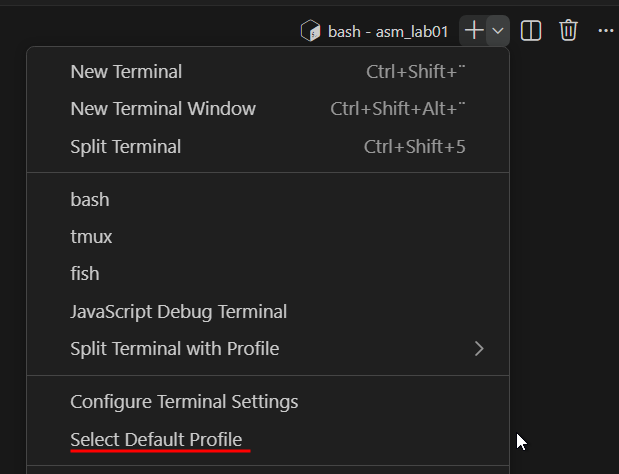
-
In your terminal, like Kitty, Alacritty, Ghostty, Konsole or whatever. This can usually be configured in the terminal configuration itself. For example Kitty is configured in
~/.config/kitty/kitty.conf. A simpleshell fishline is enough to switch. -
If the previous option is not possible or easy, it's also possible to tell your current shell, to start
fishitself. To avoid the login shell issue, it will only start it when the session is interactive (a human started it, not another background program). You can copy paste this at the top of your config (like~/.bashrc).# Start fish if this is an interactive shell # https://serverfault.com/questions/146745/how-can-i-check-in-bash-if-a-shell-is-running-in-interactive-mode if [[ $- == *i* ]] then fish fi
Or generate commands wrappers
What's a wrapper ?
A wrapper is simply a Bash function that can call the Fish function, both having the same name. When you type lxup - in Bash, it will call the lxup Bash function, which is going to start fish -c "lxup -v". Fish will start, interpret the command and finally run the true Fish function.
Copy paste this snippet into you ~/.bashrc to dynamically generate all wrappers for all Fish functions.
See snippet
# Dynamically generate Bash wrappers around all available Fish functions to access them from Bash transparently
for f in ~/.config/fish/functions/*.fish; do
    name=$(basename -s .fish $f)
    # Help from: https://stackoverflow.com/questions/7145337/bash-how-do-i-create-function-from-variable
    source /dev/stdin <<EOF
    function ${name}() {
        fish -c "${name} \$(printf ' %q' "\$@")"
    };
EOF
done
Details on the wrapper
- Thanks for this StackOverflow post: How can I keep quotes in Bash arguments.
- Note: the previous version doesn't correctly handle quoted args (
fish -c "sr $@"is not enough).
You can also create that manually yourself for each function if you prefer (I guess you don't :)
function sr() {
    fish -c "sr $(printf ' %q' "$@")"
}
Verify installation
Then the lxup command is available.
> lxup -v
Fish function v10 installed.
Now that LXUP CLI is ready, go back to the tool you was trying to install. If you started on this page, you can look at the next page to install a few basics programs.
How to update
lxup get lxup