
Setup
There are 9 tools to install for labs in this course. If you want to just install all of them at once, this setup can be installed in ~5 minutes. It supports Fedora and Ubuntu (or other Linux distributions in the same families), including the WSL versions.
If you are on Windows and don't know WSL yet, we recommend this Fedora WSL setup tutorial.
Tools used in the labs
- AWS CLI v2 - the CLI to interact with all Amazon Web Services
- gcloud - the CLI used to interact with Google Cloud
- Minikube - Manage a local Kubernetes cluster for development inside Docker or other containers/virtualisation backends
- kubectl - CLI to manage resources on a Kubernetes cluster
- Vegeta - Load testing tool. You can send tons of HTTPs requests towards a given URL to test the supported load.
- Terraform - Provider-independent cloud provisioning. Note: this is technically not 100% opensource (see the Business Source License)
- Ansible - Configure local or remote Linux machines with YAML files.
- JQ and YQ - to see JSON and YAML in the terminal - a nice to have
Instead of searching for installations docs for each one, just use our automations !
Fedora and Ubuntu
Prerequisites
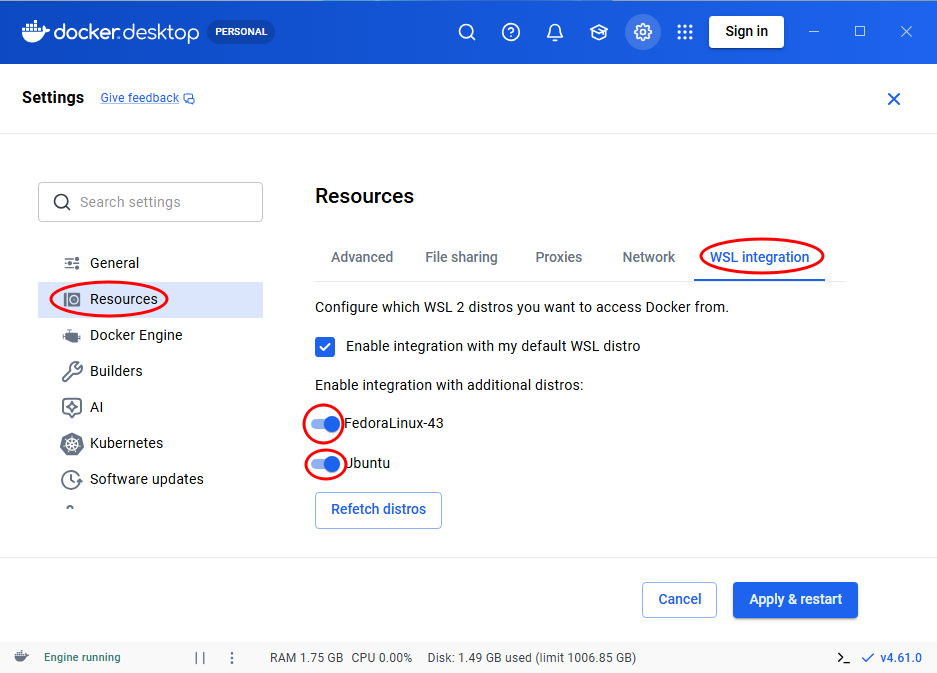
Minikube requires Docker, KVM, Qemu, Podman or Virtualbox to be installed. If you use WSL, and you use Docker on Windows, the docker command must work. Otherwise look at the screenshot to enable this integration.
See Docker Desktop settings for integration in WSL
If you use Docker, make sure you are in the docker group to use docker without sudo
You can verify that the command groups contains docker. If not, join the group and simulate login again with this commands.
sudo usermod -aG docker $USER
newgrp docker
Now typing docker ps without sudo should be possible !
Install everything
Install CLD tools via lxup. Help: I don't have lxup !
lxup play cld
Note: the task Run Minikube once to accelerate first startup later... may start a GUI popup for your sudo password.
If you see issues, try running it a second time. In case it doesn't fix it, please send me a message on Teams (search for "Samuel Roland") or by email (samuel.roland at master.hes-so.ch).
If you don't use Fish
Make sure ~/go/bin is in your PATH, you won't find vegeta otherwise
Tips
- Make an shell alias of
kubectlorminikube kubectl --tokub - Make an shell alias of
minikubetomink
In Fish
Save that into your ~/.config/fish/config.fish and restart your terminal.
alias kub "minikube kubectl --"
alias mink "minikube"
In Bash
Save that into your ~/.bashrc and restart your terminal.
alias kub="minikube kubectl --"
alias mink="minikube"
Ansible curiosity
This course introduced me to Ansible, this is when I started creating with lxup play automations :) If you are curious to see real examples of Ansible playbooks, you can check out the source of cld.yml. The quality playbook might be improved or architectured differently, but that's the best of what we can do right now.
Cleanup
To clean Minikube when you are done with the related lab.
minikube delete