
Edit the guides
You want to participate more than just sending feedbacks and telling your friends ? You want to write pages of the website or improve existing sections ? Obviously, this will require more time and skills than using the feedback system. This page will first help you with the prerequisites, and how to setup your machine. Then, you will learn about the contribution process and the few preparation steps to follow.
Note: the contribution process is still in construction, please provide any feedback via the feedback system.
Content management
A dedicated Git repository
Do you know how we can manage more than 200 pages on this beautiful website ? All the content is on a Git repository codeberg.org/lxup/productivity. Samuel Roland is currently the only one with commit access. Everyone else is sending changes via pull requests. This might change in the future, as the community will grow.
A simple content organisation
-
The repository is divided in four top folders:
meta(meta-guides about the site itself),tools(productivity tools),HEIGandMSE(courses at the two universities). Each top folder is listing its guide in a dedicated JSON file. -
The file
folders.jsondefine these top folders with a longer name.See an extract
{ "folder": "HEIG", "name": "Bachelor in Information and Communication Systems", "org": "HEIG-VD" }, -
The file
justfileis centralizing a few Bash scripts to make it easy to do common operations (just web,just sync, ...). You'll learn later how to use these commands. -
meta/guides.jsoncontains a list of generic guides (no metadata related to a course or a tool)See an extract
{ "name": "Contribute", "folder": "contrib" }, -
tools/tools.jsoncontains a list of guides with specific tools metadataSee a extract
{ "name": "Zoxide", "desc": "Never use long `cd` commands again, jump directly to the folder you have in your head.", "impact": 5, "effort": 1, "website": "https://github.com/ajeetdsouza/zoxide", "os": "all" }, -
HEIG/courses.jsoncontains a list of courses at HEIG-VD with specific metadataSee an extract
{ "name": "Programmmation Concurrente", "semester": 3, "code": "PCO", "solidity": "mature", "include": ["setup", "labs", "tools", "mental"] }, -
MSE/courses.jsonhas the same goal and format asHEIG/courses.json, with courses from the MSE in Computer Science -
On all guides, images are stored under
imgssubfolder, and schemas underschemas
See extract of files hierarchy
README.md
justfile
folders.json

meta/guides.json
meta/contrib/
├── code.md
├── content.md
├── feedbacks.md
├── intro.md
├── policy.md
└── schemas
    ├── 2026-goals.excalidraw
    ├── 2026-goals.svg
...

tools/tools.json
tools/zoxide/
├── indexing.md
├── intro.md
├── setup.md
└── usage.md

HEIG/courses.json
HEIG/ASM/
├── cli.md
├── imgs
│   ├── arm-linux-gdb-failure.png
│   ├── asm-doctor.svg
...
├── debug.md
├── intro.md
├── labs.md
├── screens.fish
├── setup.md
└── troubleshooting.md
HEIG/SYE/
├── cli.md
├── intro.md
├── labs.md
├── mental.md
├── others.md
├── setup.md
└── troubleshooting.md
...
A way to name and order guides & pages
The URL of the guide is always the path to its folder in lowercase form. For example HEIG/SYE/ will be at lxup.org/heig/sye and tools/zoxide will be accessible at lxup.org/tools/zoxide. We deliberately try to keep URLs shorts to be able to mention them orally and type them from a teacher slide without copy paste. No one want to type this kind of URL: lxup.org/schools/heig-vd/2026/courses/SYE/setup-your-local-environment...
Here is the details of the Zoxide guide, just a bunch of Markdown files.
tools/zoxide/
├── indexing.md
├── intro.md
├── setup.md
└── usage.md
But how is built the menu ? Each button is the first heading level 1 (the first # stuff). This is what makes possible to have Indexing folders not indexing in the menu.
When writing a guide, the name of the file choose the page name in the URL. When using setup.md, the page will be at lxup.org/tools/zoxide/setup. The first page is a special case: it will be accessible when no guide page is defined as well. Here, intro.md is accessible via lxup.org/tools/zoxide and lxup.org/tools/zoxide/intro.
As the default alphabetical order is usually not the desired order for display on the left menu, it is optionnally configurable. At the very top of each Markdown file, you can add a --- twice, with a few keys/values in between. This is known as frontmatter, here in the TOML format.
---
order = 3
---

# Indexing folders
This is ...
A deployment system
The following schema shows the way we create, save and deploy our guides.
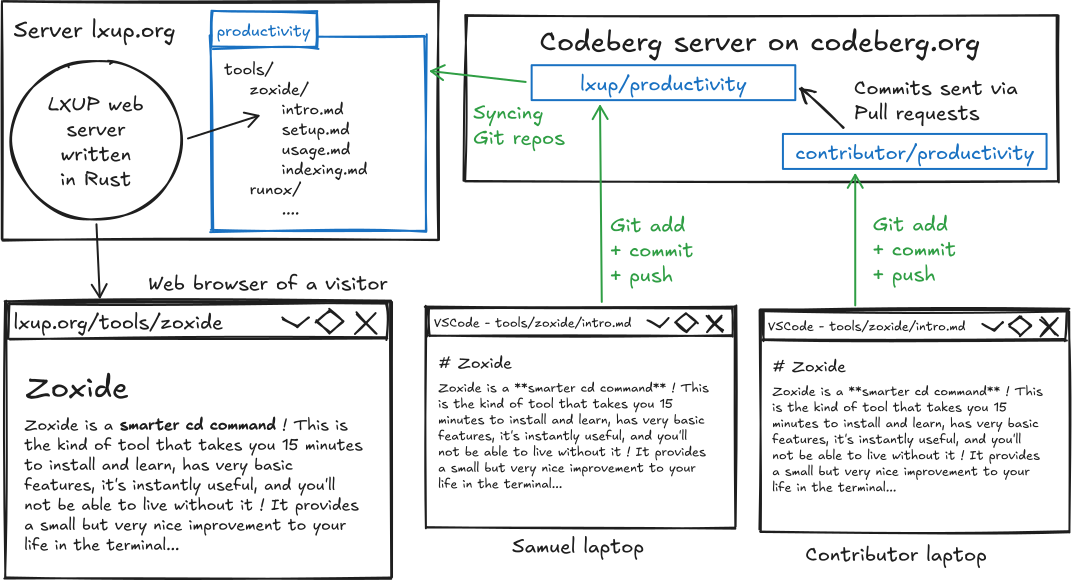
- It all starts inside a code editor on the laptop of Samuel Roland or from an other contributor.
- They are editing Markdown files, using the Zoxide introduction as an example (
tools/zoxide/intro.md). - Once the changes are good, they will save it on their respective remote repository.
- External contributors will need to get their commits into the official repository following a review process. This is current way to make sure the content is useful and reach some minimum quality standards.
- Once some commits reach
lxup/productivity, they are immediately deployed on thelxup.orgserver (<10s). This server is just a cheap VPS running the website code. The repository is cloned and synced when new changes are available. The server is alerted via a notification sent by Codeberg (a webhook to be precise).
Preparation
Before starting writing content, there is a bunch of requirements you need to install or get, configure and use to have the full experience.
Requirements
There are mainly two types of content contributions
- Very simple contributions, such as fixing a few typos, Codeberg has an online text editor that can do the job for small editions. You will need
- A web browser such as Firefox
- An account on Codeberg
- More advanced contributions (changing more sections, adding math equations, adding images, ...) you will be more at ease writing in your local code editor. This will require
- A web browser such as Firefox
- An account on Codeberg
- A text or code editor. If you don't know any one, just take VSCode. No specific extensions are required, the contribution system is editor-agnostic.
- Basic knowledge of Git (clone, pull, push, commit, add). If you don't know Git, you can learn it in an hour.
- A Docker installation to run the website locally
- Git installed and your Codeberg identity configured
- Access to Bash. For Windows, we highly recommend using WSL and we have a guide to setup WSL with Fedora.
Recommended steps
- Open your web browser and go create an account on Codeberg or login
- Fork the repository via
Forkbutton at the very top of codeberg.org/lxup/productivity - For simple contributions this is enough. Continue these steps otherwise.
- Let's say your new forked repository is now at
codeberg.org/john/productivity(wherejohnis replaced by your username) - Make sure you
Clone this repository
If you want to contribute, you'll need to clone your forked version, otherwise you can clone the deployed repository
git clone https://codeberg.org/lxup/productivity
Start the website locally
To make sure your contributions look good, especially with images, it is very simple to run the website locally. Make sure Docker is running and type this command.
just web
Then, you can simply click on localhost:9000 to visit the local website.
- Open the folder in your text/code editor, such as VSCode (by typing
code .) - If you edit any visible file and refresh the page, you should see the impact immediately.
- Lost into the sea of Markdown files?
- Open file
tools/zoxide/setup.md - Open the associated page localhost:9000/tools/zoxide/setup
- Now, edit some text anywhere, save your file.
- Reload the web page and the change will be immediately visible!
- Open file
Create qualitative content
Style and languages
The HEIG-VD and HES-SO universities are based in the French-speaking part of Switzerland. Therefore, we have a mix of English and French on the website.
Language
- We write guides in English of French, depending on the existing choice or the complexity of the subject.
- Most guides should be in English to make it broadly accessible for non French speakers. It would sad if some Swiss germans are interested in using our guides on productivity tools, but would give up because they don't want to read French. In addition, English is shorter and sometimes easier to write, and its a standard in IT.
- The IT landscape is mostly English, so we expect most students to be able to read it. There are some exceptions for math-related courses, not directly linked to IT. As they are already heavy and complex, using French is probably easier to follow. Instead of having to having to translate words like Antideratives to "Intégrales" in French, students should focus on learning not having bad time reading our text.
Target audience
- The target audience of guides about university courses are any students learning there. Teachers should also be able to review if necessary.
- The target audience of guides about productivity tools is anyone interested in IT. We aim to bring enough context and not mention university courses to avoid confusion to unaware readers.
Particularities
- We prefer using "we" instead of "I", to create a sense of community. We alternate between active and passive voice.
- In French, we use "tu" instead of "vous" when refering to the reader, to create a sense of friendship
- We try using inclusive French ("les étudiant·es")
Choose a scope
Most contributions can be done independantly
Markdown rendering
We use Markdown because this is the best format for ease of writing, reading and it renders as HTML. You'll quickly see in the existing pages, it expands beyond traditionnal Markdown. To circumvent some of the limitations of Markdown's minimalism, we extended the syntax and integrated other rendering tools. The Markdown engine is another project called DME (Delightful Markdown Experience). Please refer to DME extensions documentation.
Container toolings
just docker-build
just docker-build
Code snippets
We include the following colorizers: css, json, c, cpp, toml, xml, yaml, rust, html. (Those are Tree-Sitter grammars to be exact). Please refer to DME extensions documentation for more detail for language aliases.
Please send a feedback or contribute code (see dedicated page) to enable or integrate other languages.
Images
We want to provide top-quality images on the website, while keeping their sizes small! Therefore, we always prefer vectorial formats (SVG) or textual formats (like code snippet or command output). When this is not possible, like screenshot a desktop application, we prefer the PNG or JPG format and we optimize them.
For large images with high quality (above 2000 pixels in one side), we will reduce their size manually by reducing their format with Imagick.
Why taking care about the size so much ? There are mainly two reasons:
- Smaller images mean faster page load and less bandwidth (ultimatly leading to less server energy)
- Smaller images mean more concurrent connections loading the page fast, avoiding to increase infrastructure costs
- The Git repository is slowly being filled with more and more commits history (24 MB as of 2026-07-28). Images are the biggest source of size increase. In respect of Codeberg free service, we want to be minimize the useless storage we are taking for them. Unlike online drive system, once images are present in old commits, they cannot be easily removed and will take place forever.
TODO imagick
todo oxypng
Schemas
We really like hand-made style schemas created with Excalidraw and we have a dedicated guide about Excalidraw. We highly recommend you to follow the Local use to make it super easy to edit these schemas!

To create new schemas, you can copy paste an existing one and rename it. If you have scr, you can quickly generate a new empty one.
> cd meta/contrib/schemas
> scr draw schema-exporting-strategy
Created schema-exporting-strategy.excalidraw
# Opening in PWA...
Limitation: please always use the default Excalifont inside the schema.
Please do not generate the SVG yourself. To ensure SVG files are fully portable, are lightweight and don't embed custom fonts, we have automated post-processing.
WARNING: this doesn't work in Docker yet...
If you finished the schema and don't plan to change it, you can just generate the SVG via a single command.
> just schema HEIG/MAT2/schemas/trigo-loop.svg
✓ HEIG/MAT2/schemas/trigo-loop.svg (75.9 KB)
>>> Export to path in Inkscape
>>> SVGO optimisations
Done optimizing trigo-loop.svg, resulted in trigo-loop.opti.svg
...
Inside your Markdown file, here HEIG/MAT2/combinatoire.md, you can integrate the generated SVG relative to the Markdown path.

If you have multiple schemas to export, instead of doing just schema for each one, use this alternative. It will find the list via git status.
> just schema-all
✓ HEIG/MAT2/schemas/trigo-loop.svg (75.9 KB)
>>> Export to path in Inkscape
>>> SVGO optimisations
Done optimizing trigo-loop.svg, resulted in trigo-loop.opti.svg
...
If the schema is not created yet or will need some changes, you can run the previous workflow in watch mode. It detect any new or updated .excalidraw files in any folder inside the repository. It will run the same export logic for the file only.
> just watch
Excalidraw drawings are automatically exported to SVG, and PNG images are automatically optimized !

Watching all folders and files in the repository...

Detected changes to HEIG/MAT2/schemas/trigo-loop.excalidraw
HEIG/MAT2/schemas/trigo-loop.svg is ready and optimized with size 4.0K !

Detected new folders for schemas at meta/about/schemas !

Detected changes to meta/about/schemas/deliberate-practice.excalidraw
meta/about/schemas/deliberate-practice.svg is ready and optimized with size 4.0K !
Videos
We have limited video support right now:
- Youtube: We support
<iframe>(with some specific list of attributes) to allow embedding Youtube videos. For example, we detect the Youtube video title + channel to always print it in the same way. The video is also set in loop to avoid distracting recommendations at the end. The height and width attributes are arbitrary and may need better tweaking or dynamic calculations... - Raw videos: can be rendered using
<video>tags. - Vimeo or other services, it would be better to integrate their player instead of using raw videos tags.
Good news, no need to do that by yourself ! Use the just video action to ensure easy and consistent formatting across the website.
> just video
This script will convert online video links into Markdown snippets
[I] Please paste a single video link: 'https://www.youtube.com/watch?v=8JJ101D3knE'
Detected Youtube video, fetching metadata...

> Git Tutorial for Beginners: Learn Git in 1 Hour - Programming with Mosh
<iframe width="1000" height="563" src="https://www.youtube.com/embed/8JJ101D3knE?playlist=8JJ101D3knE&rel=0&loop=1" title="Git Tutorial for Beginners: Learn Git in 1 Hour" frameborder="0" allow="accelerometer; autoplay; clipboard-write; encrypted-media; gyroscope; picture-in-picture; web-share" referrerpolicy="strict-origin-when-cross-origin" allowfullscreen></iframe>
Note about improving the experience
One way this could be made further easier, would to have just watch to search in modified files for the pattern /video:https:.... When detected, it would generate the metadata like just video and DIRECTLY replace the /video... pattern with the generated snippet! Sadly search and replace with sed or Fish is too complicated for multilines... This can by Python script or a Rust CLI or a subcommand of the future lxup Rust CLI.
Note: this could also be a DME integration (something like  that would automatically do the transformation). This is not a big enough issue right now to invest time into developing a DME integration...
Contribute your changes
I changed a bunch of files locally, my edits look good on the local website, now what ?
How can I make that part of the official websitelxup.org?
This part is a bit more technical at first, but you'll get used to quickly, so follow along !
Commit your changes
Here is our convention to
- Commit in English to keep a coherent and git history accessible internationally. Exception are when mentionning French page (
Improve layout of unknown sums problems in MAT2 Combinatoireis okay even ifCombinatoireis a French word, it mentions the dedicated page). - Start with a verb. Examples:
Improve,Fix,Remove,Update,Delete file ...,Rename folder ...,Export, ... - Include the guide reference: short code for courses (like
MAT2) or the tool name (likeZoxide). - Some good examples
Add ASM note about asm doctor before debugAdd CloudSys tip about remote AWS instances listingAdd structure for future DME page in Markdown guide.Improve introduction to CoreutilsDelete promotion page to make Contribution guide shorterIntegrate 3 combinatorial videos + one vector video for MAT2
- Just look at the
git loghistory in case you want to see more examples.
If your commits are badly named (like wip, fix bug, or any lazy name) or it doesn't respect the above rules, we might squash them into a single commit with a name of our choice. We'll let you know in a PR comment, how to improve for the next time.
Syncing new commits from upstream
Once you did the fork, your repository will be missing some of the newest content. Before sending a PR, you need to need to sync your fork to the latest version of the official repository. In case there are Git conflicts, you also need to fix them.
To easily sync without knowing the magic Git commands, you can run
just sync
Fixing Git conflits
Some useful commands
TODO explain and comment them !
git checkout --ours .
git checkout --theirs .