Easy updates
Run all updates in a single command
You started with sudo dnf update everyday, but you also have Flatpak, Snap, NPM, TLDR cache, Yazi plugins, Go CLIs, Rust CLIs, Pip packages, ... All these packages also need updates for new features and security fixes !
Instead of having to remember all of them, create a small Fish function that contains all these updates ! Below, we give an example to copy paste into ~/.config/fish/functions/upa.fish to be able to just run upa (and UPdate them All !).
Important: you probably don't have the same list of tools, so you have to tweak it to your needs. Disable tools you don't have and install required tools (like go-global-update).
See Fish function
# SPDX-FileCopyrightText: Samuel Roland and LXUP contributors <lxup.org>
#
# SPDX-License-Identifier: MIT
# Easy updates system to "Update them All" (for all package managers)
function upa
    function step
        set_color -o green
        echo ">>>" $argv
        set_color normal
    end

    step "DNF packages"
    sudo dnf update -y

    step "Flatpak packages"
    flatpak update -y

    step "TLDR cache update"
    command tldr --update

    # step "Snap packages"
    # sudo snap refresh

    # step "NPM global packages"
    # sudo npm -g update

    step "Yazi plugins"
    ya pkg upgrade

    step "Neovim plugins via lazy.nvim"
    nvim --headless "+Lazy! sync" +qa

    # Note: this requires installing go-global-update
    # https://github.com/Gelio/go-global-update
    step "Go tools"
    go-global-update

    step "Cargo stable toolchain update"
    rustup update stable

    # Note: this requires installing cargo-update plugin
    # https://github.com/nabijaczleweli/cargo-update
    step "Cargo crates"
    cargo install-update -a --locked

    # step "Coursier (Scala toolchain)"
    # cs update

    # step "pip-audit fix"
    # python -m pip_audit --fix

    # step "Pip packages"
    # That's annoying that pip doesn't have an update command
    # Given from https://stackoverflow.com/questions/2720014/how-to-upgrade-all-python-packages-with-pip
    # TODO remove python usage and use jq instead !
    # pip --disable-pip-version-check list --outdated --format=json | python -c "import json, sys; print('\n'.join([x['name'] for x in json.load(sys.stdin)]))" | xargs -n1 pip install -U

    # step "Composer global packages"
    # For some unknown reason this clears the sudo cache, take this as the last step to avoid stopping in the middle
    # composer global update
end
Disable automatic updates
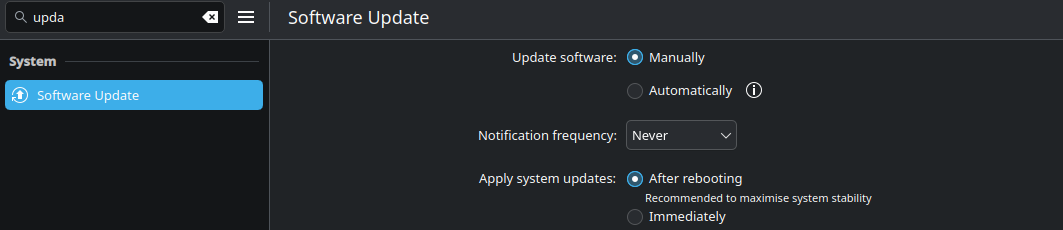
If you never do the global updates yourself, please keep this ON and ignore this section ! If you prefer to choose when updates and are done and you think about it every day or every few days, this section is for you. You have have seen that Discover is launching updates automatically and may ask for sudo password in unwanted moments (such as during presentations). If you already update it often enough yourself, you can disable this automatic behavior.
In System Settings, search for Software Update so you can change Automatically to Manually.